01
How dealer financing works
A dealer can help arrange a loan through a lender. The amount financed is the balance being borrowed after the transaction’s charges and credits are applied. APR and loan length then affect how much you pay to borrow it.
Ask for an itemized worksheet and the proposed financing disclosures. Compare the vehicle price separately from the loan. Use the same amount financed and term when comparing two APRs; otherwise a lower payment may reflect a different deal. See the
CFPB’s auto-loan information
.
02
Why monthly payment can be misleading
A payment alone cannot tell you the purchase price or total borrowing cost. It may look smaller because you paid more upfront, contributed a valuable trade, or extended the loan over more months.
Compare the amount financed, total payments, total interest, and what you contribute at signing. For the same principal and a positive fixed rate, spreading payments over a longer term typically increases interest. That trade-off deserves attention without automatically making the deal good or bad.
03
What dealer APR markup means
A lender may quote a dealer a “buy rate.” The consumer’s contract rate can be higher, and the difference may compensate the dealer. A worksheet showing only your APR does not establish the lender’s buy rate or prove that a specific markup occurred.
Ask: “Is this APR the lender’s buy rate, or has the rate been marked up?” Also ask whether other lenders approved a lower rate. Compare with an actual preapproval when you have one. Learn more from the
CFPB’s explanation of buy rates
.
04
How down payments affect payments
Cash down reduces the balance you borrow, so it can lower both the calculated payment and total interest when the rate and term stay the same. It is still money you contribute to the purchase.
“Cash due at signing” may include the down payment and other upfront charges. Do not count both amounts as separate contributions without understanding what each includes. This calculator keeps them separate and only estimates total buyer contribution when enough information is available.
05
How trade equity works
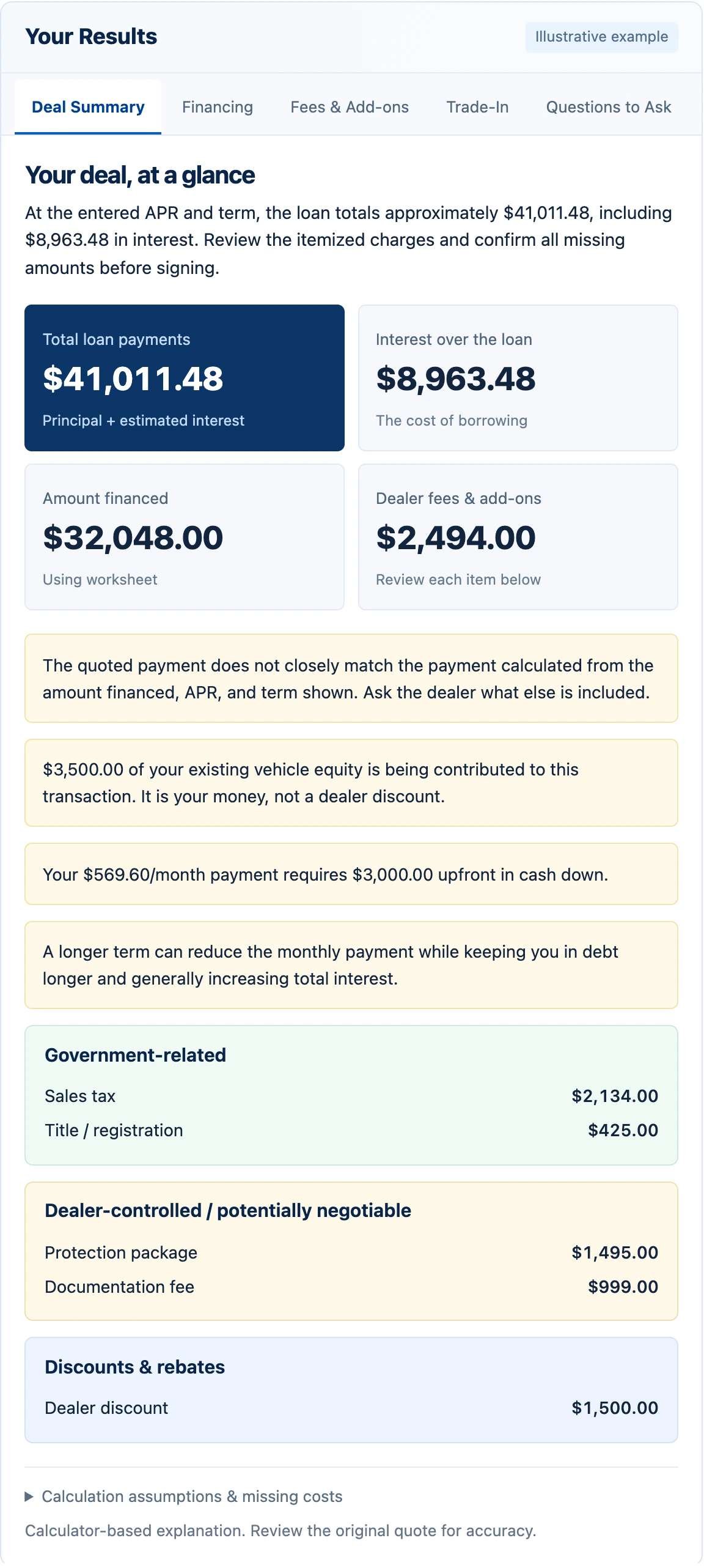
Trade equity is the allowance for your current vehicle minus the balance needed to pay off its loan. A $17,000 allowance with a $13,500 payoff leaves $3,500 in positive equity.
If applied to your purchase, that equity reduces the new balance. It comes from your existing vehicle; it is not a dealer discount. Enter both allowance and payoff so a large trade credit does not hide the debt that must be paid first. Use a current payoff amount, which can differ from the balance on a statement.
06
What negative equity means
If the payoff exceeds the trade allowance, the difference is negative equity. Someone still has to pay that balance. When included in your new financing, it adds old vehicle debt to the new loan.
Our itemized estimate assumes that entered negative equity is rolled into the new loan. Confirm whether it is financed, paid separately, or handled another way. Read the
CFPB’s guide to trading a vehicle with an unpaid loan
.
07
Dealer add-ons vs. government fees
A worksheet may combine government-related amounts, dealer charges, and optional products. Sales tax and title or registration belong in a different category from a protection package, service contract, or documentation charge.
Names alone do not settle whether a specific charge is required or negotiable. Ask who receives it, what it pays for, and how the total changes if an item is removed. The categories here are prompts for verification, not legal conclusions. If an add-on is financed, its full cost can also include interest.
08
Questions to ask before signing
Request the final out-the-door price in writing. Ask the dealer to connect every fee, discount, rebate, trade credit, and upfront payment to the amount financed. Confirm which products you selected and their individual prices.
Check that the APR, term, and payment on the contract match the offer you reviewed. Ask about payment timing, any additional lender fees, and whether a lower-rate offer changes a rebate. If the numbers change, update the worksheet and compare again before you decide.
A few common questions.
Can I use this without uploading anything?
Yes. Manual Calculator, Compare APR, and Trade-In use the numbers you enter with no AI calls. No account is needed. Your entries stay in this page while you switch tabs; refreshing or closing it clears them.
Is the calculated payment exact?
It is a fixed-rate monthly amortization estimate. APR is used as the annual rate. Actual loan schedules can differ because of fees, simple daily interest, first-payment timing, rounding, or other contract terms. We flag differences above the larger of $5 or 1% of the expected payment so you can ask what explains them.
What if the AI misses a number?
Check the extracted fields against your quote and correct them in Manual Calculator. Missing values are not invented. There are no automatic image retries; adding the missing numbers lets you continue without sending the photos again.
Does this tell me what APR I should qualify for?
No. It compares only the rates you supply, at the same principal and term. It does not check credit, estimate eligibility, or provide a loan offer. Different lender fees or rebate conditions can affect a real-world comparison.
Do you calculate my state’s taxes or determine fee legality?
No. Enter the tax and government fees shown on your quote and verify them with the dealer and the relevant authority. Unknown costs are excluded from the itemized estimate and listed in its assumptions.
What does a VIN lookup tell me?
The optional lookup uses
NHTSA vPIC
for basic vehicle details such as year, make, model, trim, and body class where available. It does not provide market value, vehicle history, or an inspection. A failed lookup does not affect the loan math.
Your quote deserves privacy.
Images are processed temporarily and are not saved by this site after analysis.
Selected images are resized and re-encoded in your browser before upload. The application validates them, processes them in a private temporary directory, and removes that directory when processing finishes or fails. An automatic cleanup pass removes files left behind after an interrupted process. Deal text and results are not written to a database or saved in browser storage.
AI analysis sends the quote text or compressed images to the configured AI provider. This site’s deletion behavior does not describe that provider’s retention practices. VIN lookup sends the VIN to NHTSA. A security cookie protects requests; no advertising or third-party analytics scripts are active in this version.
Do not upload driver’s licenses, Social Security numbers, credit applications, bank statements, or other sensitive personal information. Upload only the dealer quote, buyer’s order, or financing worksheet.
Car Deal Check is an educational calculator and analysis tool. Results are estimates based on the information provided and are not legal, financial, lending, or tax advice. Verify all figures with the dealership and lender before signing.
Sources are provided for further reading. Car Deal Check is not affiliated with NHTSA or the CFPB.